Category Archives: Web Development

From Chaos to Clarity: Turning User Research into Actionable Strategy

In the world of product development and business operations, we are often drowning in data but starving for insights. For small businesses, this “data debt” usually lives in a sprawling web of disconnected spreadsheets.

To move from a mess of rows and columns to confident business decisions, we must master two fundamental processes: Analysis and Synthesis.


1. Analysis vs. Synthesis: The User Testing Perspective
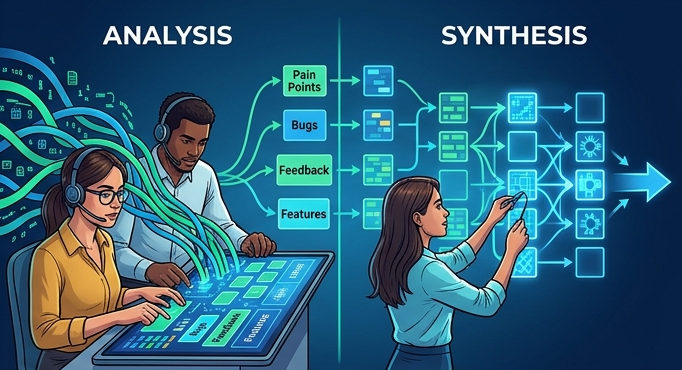
Understanding the difference between these two stages is the secret sauce of effective user research and data management.

The Deep Dive: Analysis

Analysis is the process of breaking a complex topic into smaller parts to gain a better understanding of it. In user testing, this looks like:

  • Reviewing individual session recordings.
  • Tagging specific pain points.
  • Categorizing raw feedback into buckets (e.g., “Usability,” “Pricing,” “Bugs”).

The Big Picture: Synthesis

Synthesis is the act of combining separate elements to form a coherent whole. This is where the magic happens. We take the fragments found during analysis and look for patterns. Synthesis answers the question: “What does all of this actually mean for our strategy?”


2. The Problem: The “Spreadsheet Spiral”

I recently collaborated with a small business that was hitting a wall. Their operational data—specifically their Work Orders—was trapped in a cycle of “Spreadsheet Spiral.”

The Challenges:

  • Version Control Nightmare: Multiple versions of the same spreadsheet lived in different Folders, making it impossible to know which was the “source of truth.”
  • Historical Drift: Tracking changes to historical data was manual and prone to human error.
  • Data Desync: New incoming data didn’t talk to the old data, leading to fragmented reporting and missed deadlines.

“We spent 80% of our time just trying to clean the data and only 20% actually using it to run the business.”


3. The Solution: A Unified Data Engine
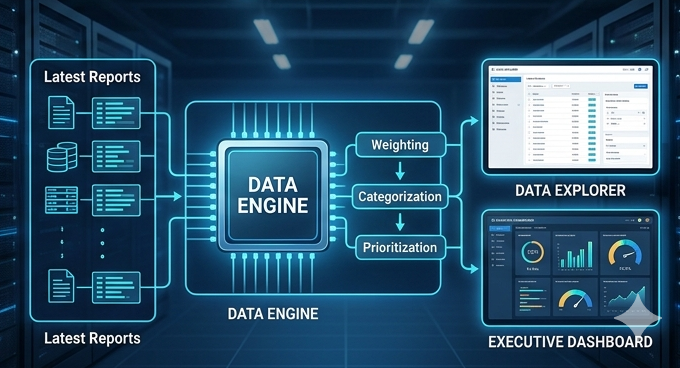
To solve this, I proposed a custom-built solution designed to automate the heavy lifting and surface the insights that matter. We moved away from manual entry and toward a streamlined data pipeline.

Key Features of the System:

  • Automated Ingestion: The system pulls the latest report data automatically, eliminating manual copy-pasting.
  • Intelligent Processing: Work orders are now automatically weighted and categorized based on priority and labor requirements.
  • The Data Explorer: A robust interface where users can view, filter, sort, and find specific records in seconds.
  • Instant Export: Need to take the data to a meeting? One-click export options keep the team mobile.

4. Accelerating Data into Action

The final piece of the puzzle was the Insights Dashboard. By synthesizing thousands of data points into visual KPIs, the leadership team no longer had to “guess” which work orders were lagging.

The Results:

  1. Speed: Decision-making moved from days to minutes.
  2. Accuracy: By eliminating manual synchronization, data integrity reached 100%.
  3. Proactive Management: The dashboard highlights trends before they become bottlenecks.

Conclusion

Data is only as valuable as the actions it inspires. By applying rigorous Analysis to understand the “what” and thoughtful Synthesis to understand the “why,” we transformed a struggling small business’s workflow from a liability into a competitive advantage.

Is your data working for you, or are you working for your data? It might be time to stop analyzing and start synthesizing.


From WooCommerce to Custom MERN Stack

How a Boutique Hair Company Scaled Their E-Commerce Site

In today’s competitive beauty and retail market, customer experience, performance, and scalability are no longer luxuries they are expectations. For one ambitious boutique hair company, the limitations of their WooCommerce-powered site began to restrict growth and efficiency. That’s when they partnered with a professional services team to build a fully customized MERN stack (MongoDB, Express.js, React.js, Node.js) e-commerce platform.

This post explores why the shift was necessary, the trade-offs of going custom, and the measurable business outcomes that followed.


Background: A Boutique Hair Business with Big Ambitions

Desyre Hair Boutique specializes in premium wigs, bundles, closures, and frontals. Their goal: to deliver a luxury shopping experience online with the same ease as in-person consultations.

Initially, they launched on WooCommerce for affordability and speed—but as their brand gained traction, cracks began to show.


Pain Points of WooCommerce

While WooCommerce provided a quick entry point into e-commerce, the platform’s limitations became more evident as the business scaled.

1. Performance Bottlenecks

  • Slower load times as product images, plugins, and traffic grew
  • Frequent downtime during product drops and flash sales

2. Customization Constraints

  • Rigid checkout process without support for installment plans or bundle builders
  • Limited control over the front-end experience without heavy plugin reliance

3. Security & Maintenance

  • Dependence on third-party plugins created security vulnerabilities
  • WordPress updates often broke site elements or customizations

Why a Custom MERN Stack Solution?

To overcome these barriers, DHB engaged MIS professional services team to design and develop a custom MERN stack platform tailored to their specific needs. The new system offered complete control, performance optimization, and scalable architecture.


WooCommerce vs. Custom MERN Stack: Pros & Cons

FeatureWooCommerceCustom MERN Stack
PerformanceLimited by hosting & pluginsOptimized with server-side rendering & APIs
CustomizationDependent on pluginsFull flexibility across UI & workflows
SecurityPlugin vulnerabilitiesCustom security protocols
ScalabilityWorks for small-to-mid catalogsBuilt for growth & enterprise-level
Time to LaunchQuick setupLonger dev lifecycle
MaintenanceRequires plugin monitoringNeeds dev support, but fewer risks
CostLow upfront, higher plugin costsHigher upfront, lower long-term costs

Features of the New Custom Platform

  • Dynamic product filters (by texture, length, color, type)
  • AI-powered wig size recommender
  • Custom bundle builder (mix-and-match closures, wefts, lace)
  • Integrated payment options (Klarna, AfterPay)
  • Real-time inventory management
  • Customer dashboard with loyalty points & order tracking
  • Mobile-first design optimized for 90%+ mobile shoppers

Quantified Success

Business Outcomes:

  • +60% Conversion Rate in first 3 months
  • 2x Increase in Average Order Value through upselling & bundling
  • 50% Reduction in Cart Abandonment
  • 75% Drop in Support Tickets related to order tracking

Customer Outcomes:

  • Faster load times: from 7 seconds → 1.2 seconds
  • Improved mobile experience: +40% engagement
  • Flexible payments: Klarna & AfterPay cited as key decision factors

Voices from the Journey

Business Owner:
“Our old WooCommerce site was holding us back. With the custom app, we’re finally in control and able to scale confidently.”

Customer:
“I never thought I’d buy a wig online, but the sizing tool and bundle builder made it easy and splitting payments sealed the deal.”


Final Thoughts: Should You Go Custom?

For DHB, outgrowing WooCommerce was inevitable. While custom MERN development requires more upfront investment, the long-term gains—in scalability, customer experience, and reduced operational friction—delivered a strong ROI.

A custom platform isn’t for every business, but for brands whose growth is outpacing WooCommerce’s capabilities, a tailored solution built by a professional services team may be the key to unlocking the next level of success.


Ready to Scale Beyond WooCommerce?

If your business is hitting similar roadblocks, consider whether a custom tech build is right for your growth strategy. The right platform could be the difference between keeping up and breaking through.

From Search Box to Strategy: My Journey with Search Appliances and What I Learned

Early in my consulting career, I had the unique opportunity to serve as the Google Search Administrator(GSA)  for a large public health agency. I was supporting an ecosystem of 26 CIOs and over 230 programs, all looking to better search, find, and make sense of the vast amount of data being crawled and indexed across our digital infrastructure.

I still remember meeting a brilliant colleague @Melvin Crum who had been the GSA admin before me. He walked me through the intricacies of the tool how to fine-tune relevance, scale with performance in mind, and push the GSA beyond its out-of-the-box capabilities. Melvin mentorship laid the foundation for what became one of the most impactful parts of my role: helping teams across the agency extract insights from content that was once hidden in plain sight.

What is a Search Appliance?

A search appliance is a purpose-built system—hardware or software—that indexes content across an organization and delivers fast, relevant search results. Think of it as a “Google-in-a-box” for your data, helping users find what they need, when they need it.

Search appliances are especially valuable for:

  • Federated search across document repositories
  • Compliance and audit workflows
  • Content-rich environments like government, healthcare, and legal

⚔️ Google Search Appliance (GSA) vs. Solr Appliance

🟡 Google Search Appliance (GSA) (Discontinued in 2018)

GSA was Google’s hardware-based search product. Plug it into your network, point it to your content, and enjoy Google-grade indexing. It was prized for:

  • 🔍 Out-of-the-box relevance tuning
  • ⚙️ Plug-and-play ease
  • 🔐 Secure search for enterprise environments

BUT… it was proprietary, limited in customization, and sunsetted by Google in 2018. Many orgs were left scrambling for alternatives.

🔵 Solr Appliance

Apache Solr, on the other hand, is an open-source search platform built on Apache Lucene—deployed by enterprises like Netflix, eBay, and NASA. When packaged as an appliance (on-prem or cloud), it offers:

  • 🎯 Highly customizable relevance scoring
  • 🧱 Modular architecture (boost search with NLP, ML, custom ranking)
  • 📈 Real-time indexing and analytics
  • 🌐 Community-driven innovation

Solr requires more hands-on tuning, but gives you complete control—ideal for teams that want to fine-tune search logic or integrate AI/ML into their ranking models.

🏢 On-Premise vs. ☁️ Cloud Deployment

FeatureOn-PremiseCloud-Hosted (e.g., SolrCloud, AWS, Azure)
ControlFull control over data & tuningManaged infrastructure with less ops overhead
SecurityFits strict compliance needsSecure but subject to third-party governance
ScalabilityHardware-dependentAuto-scale on demand
MaintenanceYour team owns updates, patchesHandled by provider (if using managed services)
CostHigher upfront costPay-as-you-go, more flexible

For regulated industries or air-gapped environments, on-prem makes sense. For agile product teams or SaaS platforms, cloud-first is the future.

📊 Relevance: How Do GSA and Solr Compare?

When it comes to relevance, both GSA and Solr delivered—just in different ways:

  • GSA used Google’s proprietary algorithms—great out-of-the-box, but less transparent and hard to customize.
  • Solr requires manual tuning of relevancy signals—like boosting by recency, field weight, or user behavior—but offers full visibility and flexibility.

🔁 In real-world comparisons:

  • GSA performed better initially, with less setup.
  • Solr improved over time, especially when paired with user feedback loops, synonyms, and machine learning models.

🧠 Final Thoughts: What Should Your Team Choose?

If your organization needs speed, control, and long-term scalability, a modern Solr-based solution—whether on-prem or cloud—is a future-proof bet.

✔️ For Technical Leads: Solr’s flexibility means you can evolve with your data

✔️ For Product Managers & Owners: More control = better user experience

✔️ For Senior Leadership: Investing in an open, extensible platform drives long-term ROI

🔎 Search is more than a box—it’s a strategy.

Choose the tool that puts your users, content, and vision at the center.

#EnterpriseSearch #Solr #ApacheSolr #SearchTechnology #ProductManagement #DigitalTransformation #SearchRelevance #TechnicalLeadership #UserExperience #SearchStrategy

Advancing Digital Inclusion: Accessibility Testing with the Axe Dev Tools Chrome Extension

In the era of digital-first services, ensuring that applications and websites are accessible to all users—including those with disabilities is not just a legal mandate but a moral imperative. As organizations strive for compliance with standards like WCAG, Section 508, and ADA, integrating accessibility testing into development workflows is essential. Among the tools that make this goal attainable is the Axe Dev Tools Chrome Extension, a powerful utility from Deque Systems.

This article explores the features, benefits, limitations, and strategic importance of incorporating Axe DevTools into accessibility testing programs, particularly for accessibility SMEs, health communication experts, technical SMEs, and senior leadership seeking to champion inclusive digital experiences.


Understanding Axe DevTools

Axe DevTools is a browser extension for Chrome and Edge that enables developers and testers to identify accessibility issues directly within the browser. Built on the open-source axe-core library, the tool provides fast, reliable, and actionable insights into accessibility violations.

Key Features:

  • Automated Scanning: One-click scans identify common accessibility violations across your page, categorized by severity.
  • Element Highlighting: Issues are visually indicated in the DOM with clear annotations and descriptions.
  • Guided Testing (Pro Version): Step-by-step manual testing instructions for complex interactions such as keyboard navigation and screen reader behavior.
  • WCAG Compliance Mapping: Each issue is linked to relevant WCAG success criteria, making it easy to align findings with compliance frameworks.
  • Exportable Reports: Generate shareable reports for documentation, triage, and stakeholder communication.

Benefits of Axe DevTools for Technical and Accessibility Teams

1. Improves Developer Empathy and Awareness

By surfacing accessibility issues in the developer’s natural workflow, Axe DevTools helps bridge the gap between code and lived user experience.

2. Speeds Up Issue Identification

The tool enables real-time feedback, helping teams catch and fix issues early in the development cycle before they reach QA or production.

3. Supports Shift-Left Testing

Axe DevTools encourages the integration of accessibility checks earlier in the software lifecycle, minimizing technical debt and reducing the cost of remediation.

4. Enhances Team Collaboration

Clear, well-documented issue reports facilitate collaboration among designers, developers, testers, and accessibility SMEs.

5. Integrates with CI/CD Workflows

Although the Chrome extension is primarily for manual testing, Axe’s broader ecosystem includes CLI tools and APIs that can be used to automate accessibility testing in CI/CD pipelines.


Strategic Importance: Compliance, Risk Mitigation, and Inclusion

Why Accessibility Testing Matters:

  • Legal Compliance: Organizations in healthcare, education, government, and commerce are required to meet standards such as WCAG 2.1 and Section 508. Non-compliance can result in lawsuits, fines, and reputational damage.
  • Digital Equity: In health communication, accessible content ensures that critical information reaches all populations, including those with visual, auditory, motor, or cognitive impairments.
  • Operational Efficiency: Early testing reduces downstream development and QA costs by addressing issues before they proliferate.
  • Brand Trust: Demonstrating a commitment to accessibility enhances brand perception and aligns with DEI (Diversity, Equity, and Inclusion) goals.

Pros and Cons of Axe DevTools

✅ Pros:

  • Intuitive user interface with minimal learning curve
  • Based on the widely trusted axe-core engine
  • WCAG-compliant issue categorization
  • Exportable reports for traceability and documentation
  • Supported by a strong community and documentation base

❌ Cons and Drawbacks:

  • Limited to Chrome and Edge (no Firefox/Safari support)
  • Free version covers only automated testing; advanced guided testing requires a Pro license
  • Does not replace the need for full manual and assistive technology testing (e.g., screen reader audits)
  • May produce false positives or overlook contextual issues that require human judgment

Incorporating Accessibility into CI/CD Pipelines

While the browser extension is a great entry point, a mature accessibility strategy incorporates automation into CI/CD pipelines using the axe CLI, axe-linter, or integration with tools like Jenkins, GitHub Actions, or Azure DevOps.

Best Practices:

  • Run automated accessibility scans on every build
  • Gate releases based on severity of accessibility violations
  • Combine automated checks with manual testing cycles
  • Include accessibility status in release dashboards for visibility

Conclusion

For organizations committed to digital inclusion, the Axe DevTools Chrome Extension is a vital instrument in the accessibility testing toolkit. It empowers developers to act early, supports compliance efforts, and enhances collaboration across technical and non-technical teams.

By integrating accessibility checks into CI/CD pipelines and aligning with best practices in health communication, product development, and enterprise governance, teams can ensure that their digital experiences are not only functional but universally usable.

Recommendation for Leadership and SMEs: Treat accessibility not as a checklist item but as a continuous practice embedded into your development culture. Axe DevTools is an accessible entry point toward achieving that mission.

Workflow Automation

Boosting Efficiency with Workflow Automation: A Guide for Small Businesses, Tech Startups, and Entrepreneurs

In the fast-paced world of modern business, efficiency isn’t just a luxury — it’s a necessity. For small businesses, tech startups, and entrepreneurs striving to scale and compete, streamlining workflows can mean the difference between success and stagnation.

Enter workflow automation: a game-changing approach to replacing manual, time-consuming processes with digital efficiency.

But what tools make this transformation possible? For many businesses, the magic lies in tech stacks like LAMP, MEAN, and MERN. These powerful frameworks offer the backbone for creating tailored solutions to simplify workflows, boost productivity, and cut costs.

Let’s dive into what these stacks are and how they can revolutionize your operations.

The Power of Workflow Automation

Workflow automation replaces repetitive manual tasks with automated processes, reducing errors and freeing up time for more strategic activities. Whether it’s managing customer inquiries, processing orders, or handling data synchronization, automation tools can:

  • Save Time: Automate routine processes, allowing teams to focus on high-value work.
  • Enhance Accuracy: Eliminate human errors common in repetitive tasks.
  • Boost Scalability: Handle increasing workloads without a proportional rise in costs or staff.
  • Improve Collaboration: Streamline communication and ensure team members stay aligned.

LAMP, MEAN, and MERN: Foundations of Automation

Workflow automation doesn’t happen by magic. It requires robust frameworks to build applications and integrate processes effectively. That’s where LAMP, MEAN, and MERN come in.

1. LAMP (Linux, Apache, MySQL, PHP)

LAMP stack

The LAMP stack is a tried-and-true framework that has powered countless web applications. It’s especially valuable for small businesses looking for reliable and cost-effective solutions.

  • Linux: Provides a stable, open-source operating system.
  • Apache: Handles web server duties for hosting applications.
  • MySQL: Manages databases, enabling efficient storage and retrieval of information.
  • PHP: Offers flexibility in coding server-side scripts.

Use Case: Automating a customer feedback system. LAMP can power a web-based application that collects feedback, organizes it in a database, and triggers automated follow-ups or analytics dashboards.

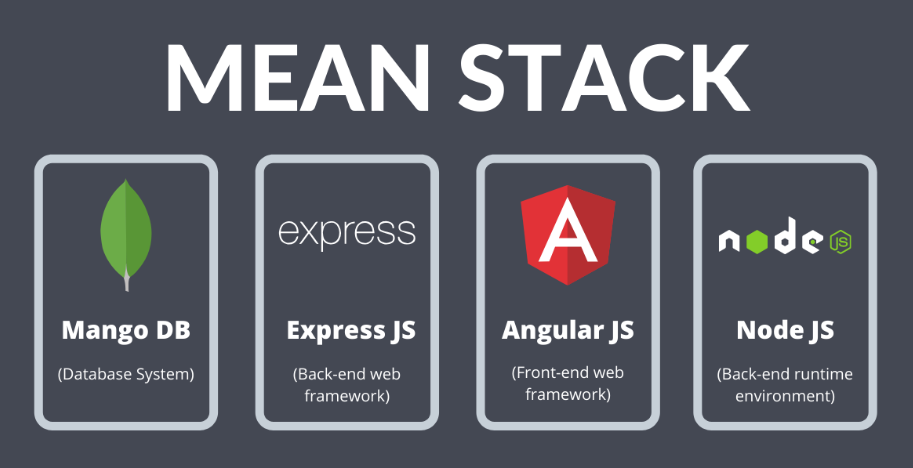
2. MEAN (MongoDB, Express.js, Angular, Node.js)

MEAN stack

The MEAN stack is a modern, JavaScript-based framework ideal for creating dynamic, cloud-ready applications. Its versatility makes it a favorite among tech startups.

  • MongoDB: A NoSQL database for flexible, scalable data storage.
  • Express.js: Simplifies backend development with robust middleware.
  • Angular: Builds dynamic, user-friendly frontends.
  • Node.js: Ensures high-speed server-side operations.

Use Case: Automating inventory management. A MEAN stack application can track stock levels in real time, send alerts for low inventory, and sync data with sales systems.

3. MERN (MongoDB, Express.js, React, Node.js)

MERN stack

Similar to MEAN, the MERN stack swaps Angular for React, a popular library for building highly interactive user interfaces. MERN is perfect for businesses prioritizing seamless user experiences.

  • React: Enables developers to create fast, responsive interfaces.

Use Case: Automating client onboarding. A MERN stack application can guide clients through a self-service onboarding process, integrating with CRM tools for automatic data entry.

Why These Stacks Matter for Small Businesses and Startups

  1. Cost Efficiency: Open-source components keep development costs low.
  2. Scalability: Easily handle growing workloads as your business expands.
  3. Customizability: Tailor solutions to your unique needs, ensuring relevance and usability.
  4. Integration Capabilities: Seamlessly connect with third-party tools and APIs, such as payment gateways, marketing platforms, and analytics tools.

Getting Started with Workflow Automation

Implementing workflow automation might feel daunting, but these steps can guide you:

  1. Identify Bottlenecks: Analyze existing workflows to pinpoint inefficiencies.
  2. Set Clear Goals: Define what you want to achieve with automation (e.g., faster processing, better accuracy).
  3. Choose the Right Tools: Select the stack that aligns with your business needs and technical expertise.
  4. Develop and Test: Work with developers to build and test your automation solutions.
  5. Monitor and Optimize: Continuously refine workflows to ensure maximum efficiency.

Final Thoughts

In today’s competitive landscape, workflow automation isn’t optional — it’s essential. With frameworks like LAMP, MEAN, and MERN, small businesses, tech startups, and entrepreneurs can unlock new levels of efficiency and innovation. By embracing these tools, you’re not just streamlining processes; you’re building a foundation for sustainable growth.

So, what’s holding you back? Dive into workflow automation today and watch your business transform.